📘 About the Number to Words Converter
This calculator converts numeric values into their full English word format instantly. It supports large numbers (up to quintillions), decimal values, and negative numbers. Simply enter a number and the tool spells it out correctly in words.
🔢 Supports Large Numbers
The converter handles numbers in grouped sets of three digits using scale names:
- Thousand
- Million
- Billion
- Trillion
- Quadrillion
- Quintillion
This allows accurate conversion of very large numbers.
➖ Handles Negative & Decimal Numbers
The calculator automatically:
- Adds “minus” for negative numbers
- Separates decimal values
- Converts the decimal portion into words
Example: -1728.42 becomes “minus one thousand seven hundred twenty eight and forty two decimal”.
✍️ Input Validation & Error Handling
The tool ensures accurate results:
- Checks for empty input
- Prevents non-numeric entries
- Displays clear error messages
This makes the converter reliable and user-friendly.
⚡ Instant Conversion
With one click, the number is converted into words:
- No page reload required
- Works on mobile and desktop
- Clear and reload options available
🧮 Formula & Conversion Logic
Converting a number into words may appear simple, but internally the calculator follows a clear mathematical and logical process. The algorithm divides the number into smaller groups and then converts each group into words using predefined arrays and rules. This approach ensures that both small numbers and extremely large numbers are spelled correctly in English.
The number-to-word conversion process is based on grouping digits into sets of three. Each group represents hundreds, tens, and units. These groups are then assigned scale names such as thousand, million, or billion depending on their position in the number.
Core Conversion Formula
The fundamental logic used in the converter can be expressed as:
Number = Σ (Group × Scale)
Where:
- Group represents a three-digit number (0–999)
- Scale represents the positional value such as thousand, million, or billion
- The final result is the combination of each group converted into words with its respective scale
Example of Number Breakdown
Consider the number:
4,352,719
The calculator splits the number into groups of three digits:
- 4 → Million group
- 352 → Thousand group
- 719 → Units group
Each group is converted individually:
- 4 → four million
- 352 → three hundred fifty two thousand
- 719 → seven hundred nineteen
Final result:
four million three hundred fifty two thousand seven hundred nineteen
Rule for Converting Hundreds
Each three-digit group is converted using the following logic:
abc = (a × 100) + (b × 10) + c
Where:
- a represents the hundreds digit
- b represents the tens digit
- c represents the units digit
Example:
345 = three hundred forty five
Decimal Number Conversion
When a number contains a decimal point, the calculator processes the number in two parts:
- The integer part before the decimal
- The fractional part after the decimal
The decimal value is converted separately and appended to the final result.
Example: 12.45 → twelve and forty five decimal
Handling Negative Numbers
If a number begins with a minus sign, the calculator simply adds the word “minus” at the beginning of the converted result.
Example: -500 → minus five hundred
This rule ensures that the numerical sign is preserved while keeping the wording clear and grammatically correct.
⚙️ How the Converter Works
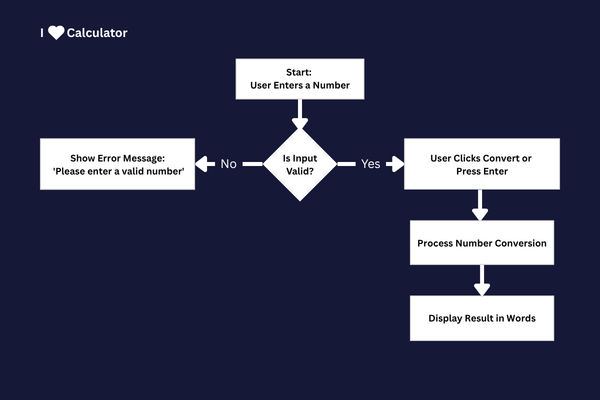
1. Enter a number in the input field.
2. The calculator checks if the value is valid.
3. The number is split into groups of three digits (hundreds).
4. Each group is converted into words (e.g., 345 → “three hundred forty five”).
5. Scale names (thousand, million, etc.) are added based on position.
6. If decimals exist, they are converted separately and appended.
7. If the number is negative, the word “minus” is added at the beginning.
8. The final result is displayed instantly.
All processing is done using JavaScript in real time, ensuring fast and accurate number spelling.
📌 Example
Suppose you enter:
125034
The calculator converts it into:
one hundred twenty five thousand thirty four
The number is broken into groups (125 and 034), converted separately, and combined with the scale name “thousand”.