📘 About the Surd (Radical) Simplifier
This calculator simplifies square roots (radicals) into their exact surd form. It finds the largest perfect square factor of the number under the square root and rewrites the expression in simplified radical form instantly.
🔢 Enter a Number Under √
Simply type a positive number inside the input field. The calculator works for whole numbers such as:
- √18
- √50
- √72
- √144
Results update automatically as you type.
🧮 Automatic Perfect Square Detection
The calculator:
- Finds the largest perfect square factor of the number
- Extracts the square root of that perfect square
- Leaves the remaining factor inside √
This guarantees the result is always shown in fully simplified surd form.
✍️ Input Validation & Error Handling
The calculator ensures safe and accurate results:
- Accepts only positive numbers
- Displays an error for zero or negative inputs
- Prevents invalid calculations
Clear error messages guide users when input is incorrect.
⚡ Instant & Interactive
Results appear instantly without reloading the page.
- Live calculation on input
- Animated result display
- Quick clear and reload options
🧮 Surd Simplification Formula & Mathematical Logic
A surd is a square root that cannot be simplified into a whole number. In mathematics, radicals such as √18, √50, or √72 are simplified by extracting perfect square factors from inside the square root. The Surd Simplifier calculator automatically applies this rule to rewrite radical expressions in their simplest form.
The fundamental idea behind surd simplification is to separate the number under the radical into two factors: one perfect square and one remaining number. The square root of the perfect square can be taken outside the radical sign, while the remaining factor stays inside the radical.
Core Surd Simplification Formula
The mathematical rule used by the calculator can be expressed as:
√n = √(a² × b)
Where:
- n = the number under the square root
- a² = the largest perfect square factor of n
- b = the remaining factor after removing the perfect square
After applying the square root rule, the simplified form becomes:
√n = a√b
Step-by-Step Radical Simplification
To simplify a radical expression, the calculator performs the following mathematical steps:
- Identify the number inside the square root
- Search for the largest perfect square factor of the number
- Split the number into two factors
- Extract the square root of the perfect square
- Leave the remaining factor inside the radical
- Combine the result into simplified surd form
This method ensures that the radical expression is reduced to its most compact and exact mathematical representation.
Example of Surd Simplification
Consider the number:
√72
First, we find the largest perfect square factor of 72.
72 = 36 × 2
Now apply the square root rule:
√72 = √(36 × 2)
Separate the square root:
√72 = √36 × √2
Since √36 is a perfect square:
√36 = 6
Final simplified result:
√72 = 6√2
When the Number is a Perfect Square
If the number under the radical is already a perfect square, the radical simplifies directly into a whole number without any remaining surd.
For example:
√144 = 12
Because 144 is equal to 12², the radical disappears completely.
Why Surd Simplification is Important
Surds appear frequently in algebra, geometry, trigonometry, and calculus. Exact radical forms are often preferred instead of decimal approximations because they preserve mathematical precision.
For example, the exact value √2 is more accurate than the decimal approximation 1.414. Keeping results in surd form allows mathematicians, students, and engineers to perform further calculations without losing precision.
This Surd Simplifier calculator automates the entire process, making it easy to obtain exact radical results instantly without performing manual factorization.
⚙️ How the Calculator Works
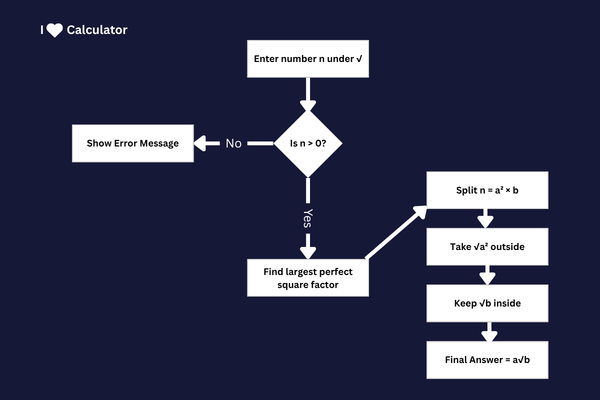
Step-by-step flowchart of how the calculator simplifies √n into its exact surd form.
1. You enter a positive number n under the square root.
2. The calculator searches for the largest perfect square factor of n.
3. It separates n into:
n = (perfect square) × (remaining factor)
4. The square root of the perfect square moves outside √.
5. The remaining factor stays inside √.
6. The simplified surd form is displayed instantly.
All calculations are performed using JavaScript in real time, ensuring fast and accurate radical simplification.
📌 Example
Suppose you enter:
√72
The calculator finds:
72 = 36 × 2
√72 = √(36 × 2)
√72 = 6√2
The largest perfect square factor (36) is extracted, leaving 2 inside the radical.